































Anonymous
Forum Replies Created
-
In reply to: Error 500 Install – header.inc.php
August 15, 2019 at 12:38 pm #4958stevland
KeymasterSorry, I didn’t foresee this possibility. In my experience, when a zip archive has corruption, nothing will extract. I can’t recall that I’ve ever ended up with a partial extraction.
In any event, I assume you are now uploading all of the newly extracted files to your server, yes?
Please let me know if this resolves the issue.
In reply to: Mobile version: advanced search queues missed
August 15, 2019 at 12:31 pm #4957KeymasterI see what you are saying now!
The whole osTicket navigation system was revamped in v1.11. I can’t recall why I didn’t include search in osTicket Awesome’s mobile navigation. Two possibilities come to mind:
- I already had a Search field and an Advanced Search button in place, so I may have decided that these were adequate. If this is the case, I either didn’t realize that I was leaving out the Personal Search items in the mobile navigation, or I figured this feature wouldn’t be terribly missed (please note that it has never been my intention for the mobile layout to have 100% of the functionality that the desktop version has).
- The new osTicket code that generates the navigation items is actually quite sophisticated. On my end it required quite a bit of hackery to transpose it into osTicket Awesome’s mobile navigation. I brought in a full-time PHP programmer to help work out the bugs. It is possible that we just could not get the Search functionality to cooperate.
tl;dr I can’t recall exactly why Search is missing from the mobile navigation. I will look into this and see what I can come up with and I will eventually let you know. Sorry, I can’t promise that it will happen soon (or even at all).
There is an easy workaround for this though. When you click on a Personal Search in desktop layout you’ll notice the URL:
/scp/tickets.php?queue=20
Therefore, your staff can easily create bookmarks in their mobile web browser for their Personal Searches.
I hope this helps.
In reply to: Error 500 Install – header.inc.php
August 15, 2019 at 11:13 am #4954KeymasterWhat if the URL of your installation?Nevermind. I notice now that it is a private network address (10.0.0.171).
Are you running the latest version of osTicket Awesome (osTicket-1.12.2-Awesome-101)?
In reply to: Error 500 Install – header.inc.php
August 15, 2019 at 10:43 am #4953In reply to: Mobile version: advanced search queues missed
August 14, 2019 at 5:26 pm #4950KeymasterI’m sorry if I’m missing something, but this functionality already exists in osTicket Awesome.
I add a Personal Queue. It shows up in the desktop navigation, of course:
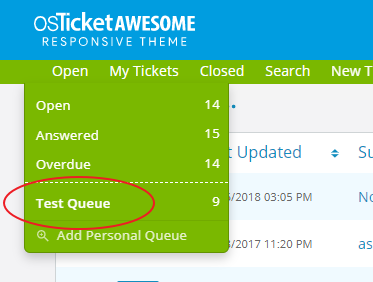
And it also shows up as a subnav item of Open in the mobile layout:
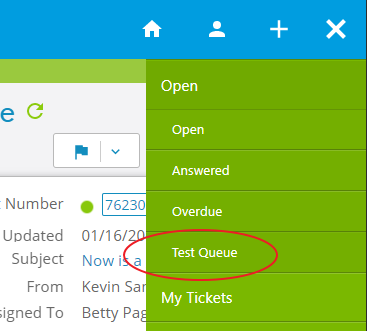
I am also confused by your use of the term Search Queue, as that is something different. So we must be miscommunicating.
Please clarify your question.
In reply to: error display delete button become smaller when enable plugin attachment_preview
August 14, 2019 at 10:03 am #4949KeymasterVery cool… an improvement for now. Hopefully this will help someone else. Thanks for sharing!
In reply to: error display delete button become smaller when enable plugin attachment_preview
August 14, 2019 at 9:42 am #4947In reply to: Where is my thread?
August 12, 2019 at 10:00 am #4936KeymasterActually, hold on.
I just retraced your steps and reproduced the first issue “…datetime is always wrong formatted.”
I then did the same in my vanilla osTicket v1.12.2 installation.
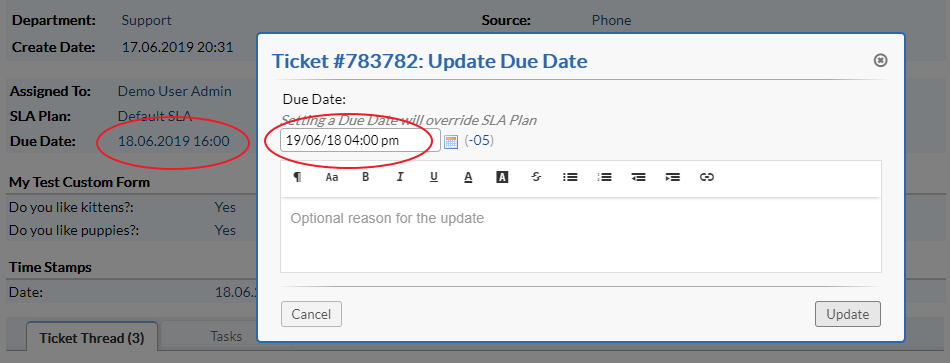
Therefore, I suspect that all of the issues you’ve found are actually osTicket core issues—not an osTicket Awesome issues. Please submit your report it in the osTicket Forum or, better yet, open an issue on GitHub.
In reply to: Where is my thread?
August 12, 2019 at 9:50 am #4935KeymasterI’m sorry for your trouble. I have no idea what happened to your post.
I did receive an email notification. The link to the actual post kind of works, but it leads to a blank page. Very odd.
The email notification includes your text, so at least there’s that. But unfortunately it doesn’t include your screenshots. I’ll have to ask you to kindly post it again.
Here is your original text for reference:
When I view a ticket, the duedate is formatted as set in general admin settings. In my case it’s:
dd.MM.y HH:mm
so now it’s 12.08.2019 12:13Now, with the new datepicker UI addon things become weird…
…when you open the datepicker in order to update the duedate: the initial time part (when opening the datepicket) of datetime is always wrong formatted. See:
BUT: if you change the date / time (without saving), the time gets formatted in datepicker as set up in general osTicket options:
We need the initial datetime in datepicker’s form with correct time format, but no matter what I do it comes with am/pm format.
Next weird thing… let’s start with duedate set to 2019/08/23 03 pm:
Now, we open the edit-ticket dialog and change anything: for instance, change the subject of the ticket. Now, wenn you click on “save” and hold execution with debug mode, you can see in both, the UI and POST-variables, that the duedate switches to <current duedate> -1 day at 10 pm:
but it results in:
The issue is not just about the magic change to 00:00 but also about the validation: since we do not allow due dates in the past, the updater sometimes does not accept a change because due date is supposed to be in the past (but it’s today’s evening for example).
The datepicker UI was working perfectly well before update to 1.12.2 (revision 1). Now, with the datepicker “addon”, everything feels weird around the usage of datepicker…
In reply to: Awesome Receipt missed
August 12, 2019 at 9:32 am #4934In reply to: Tamaño de logo + fondo de inicio
August 12, 2019 at 9:21 am #4933KeymasterEl logotipo tiene que ser algo rectangular … no puede ser cuadrado. Pero puede cargar cualquier tamaño y se redimensionará para adaptarse al diseño.
La imagen de fondo también puede ser de cualquier tamaño, pero debe tener al menos 800 x 600 para verse bien. Sin embargo, si es demasiado grande y / o de alta resolución, se cargará un momento cada vez que alguien vaya a la página de inicio de sesión.
Espero que esto ayude.
In reply to: Error al subir los logos de mi empresa
August 9, 2019 at 2:10 pm #4918KeymasterMe alegro de que se haya resuelto.
In reply to: Error al subir los logos de mi empresa
August 9, 2019 at 12:22 pm #4916KeymasterDe acuerdo, ingrese este comando:
chown -R www-data:www-data /var/www/html/support/Ahora intente cargar un logotipo y avíseme si funciona.
In reply to: Error al subir los logos de mi empresa
August 9, 2019 at 12:10 pm #4914KeymasterApache se ejecuta con el usuario www-data.
Ahora ingrese este comando:
groups www-dataIn reply to: Error al subir los logos de mi empresa
August 9, 2019 at 11:54 am #4912Keymaster¡Oh muchacho, esto es muy frustrante!
Casi tienes el comando correcto. Hay dos instancias de -v donde ha usado -V.
¡Idea Nueva! Copie el comando de esta página.