































Anonymous
Forum Replies Created
-
In reply to: Advanced search columns
June 25, 2019 at 10:17 am #4727stevland
KeymasterHi @Absolute,
I see what you mean, but the same it true in standard osTicket:
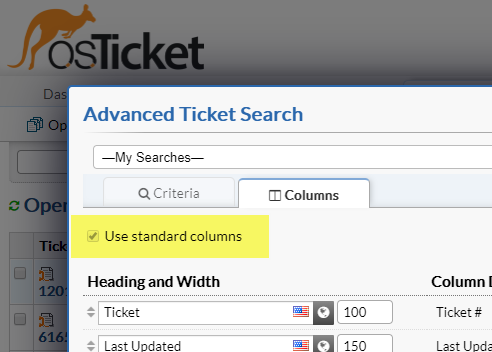
Therefore, this question pertains to osTicket, not osTicket Awesome.
You should consider asking the question in the osTicket Forum.
In reply to: Translation italian
June 24, 2019 at 6:16 pm #4725KeymasterAnyway, all you need to do is open /index.php in the root of your osTicket Awesome directory.
Delete lines 66 and 75
<?php echo __(‘Please provide as much detail as possible so we can best assist you. To update a previously submitted ticket, please login.’);?>
and
<?php echo __(‘We provide archives and history of all your current and past support requests complete with responses.’);?>
Simply replace those lines with the text that you want to appear.
In reply to: Display Error in Ticket Overview
June 24, 2019 at 6:08 pm #4724KeymasterThank you for giving me access to your installation, @fachmarkt!
In reply to: Custom Form Field – Keeps Loading
June 24, 2019 at 6:07 pm #4723KeymasterHi webtekpc,
Can you post a screenshot?
In reply to: Bug on Chrome Android?
June 24, 2019 at 6:05 pm #4722KeymasterFixed!<br />
<br />
If anyone else has this issue, the quick fix:<br />
<br />
Admin Panel > Settings > Tickets > Settings > Top-Level Ticket Counts: uncheck<br />
<br />
The next release will fix this permanently.In reply to: Display Error in Ticket Overview
June 21, 2019 at 8:27 am #4718KeymasterI figured out what is going on with your second issue.
All of the ticket subjects that have lost their link are really long and have been truncated using jQuery.
Unfortunately, for whatever reason, the jQuery is behaving differently within your installation and is stripping away the anchor tags.
It is a really easy fix.
Open /include/staff/templates/queue-tickets.tmpl.php and change line 355 from
jQuery(".truncate").each(function(i, value) {to
jQuery(".truncate a").each(function(i, value) {In reply to: Display Error in Ticket Overview
June 21, 2019 at 8:22 am #4717In reply to: Display Error in Ticket Overview
June 20, 2019 at 8:52 am #4714KeymasterThat was easy …
Easy for you. : P
I cannot click the Topics we can see in black color… whats going wrong here?
I don’t know. Are those tickets from a different source than the others (such as email)?
Do you still have a backup of your original osTicket directory to compare? If yes, what is the URL please?
For example, if your osTicket was originally https://mydomain.com/support, then the first step in the osTicket Awesome installation instructions is to rename it to https://mydomain.com/support-old.
—
BTW (in case you haven’t realized this yet), you can still click on the Ticket # for now to view the ticket.In reply to: Bug on Chrome Android?
June 19, 2019 at 9:07 pm #4710KeymasterHmmm I wouldn’t think so but I’m not really sure.
FTP?
In reply to: Bug on Chrome Android?
June 19, 2019 at 7:12 pm #4708KeymasterThank you for providing access, @techcare.
I noticed something else that seems to be related. In the desktop layout when I click on a navigation link, for a moment the ticket counts (in brackets) appear on the screen.

Those ticket counts were displayed in earlier versions of osTicket, but they definitely shouldn’t display in osTicket v1.12 (or osTicket Awesome for that matter).
Can you think of anything unique about how you installed osTicket Awesome, or some setting that you have configured, that may account for this behavior?
Now I am wondering if you will grant me FTP access to have a look around on that side of things?
In reply to: Display Error in Ticket Overview
June 19, 2019 at 6:50 pm #4707Keymaster@fachmarkt. I was able to successfully access your osTicket Awesome installation and track down the source of the issue. Thank you.
You are using the attachment_preview plugin. When the plugin is disabled, the issue is not present.
I have opened a GitHub issue with the plugin developer in the hope that he’ll have an idea as to what the conflict may be.
@Aliplast, I am assuming that you are using the same plugin, yes?
@fachmarkt I left the plugin disabled in your installation. If you wish to re-enable it you can do so by going to Admin Panel > Manage > Plugins.In reply to: Bug on Chrome Android?
June 18, 2019 at 1:06 pm #4703KeymasterThis same display glitch was reported once before by a user in the osTicket.com forum. He later claimed that the issue was resolved, although I wasn’t confident that it was because I didn’t do anything to address it. I can’t reproduce it on my end.
If you would consider giving me access to your installation to have a look I sure would appreciate it.
If yes, I will need you to create a temporary agent account (Admin Panel > Agents > Add New Agent) using info@osticketawesome.com. Be sure to give the account full administrative privileges.
In reply to: Customer form: Long Display Box has no end, and maybe is too long?
June 18, 2019 at 12:55 pm #4702KeymasterI’ll marked this Resolved for now, but I am happy to investigate further if you wish me to do so.
In reply to: Customer form: Long Display Box has no end, and maybe is too long?
June 18, 2019 at 12:48 pm #4701KeymasterI still can’t reproduce the issue on my end.
With Allow HTML selected the redactor toolbar is present, when deselected it is not.
So unfortunately your users will not have access to the formatting tools that the toolbar provides:

If you decide at some point that you would like me to investigate further, I will need you to create a temporary agent account (Admin Panel > Agents > Add New Agent) using info@osticketawesome.com. Be sure to give the account full administrative privileges.
But if you’re happy with this solution, great!
In reply to: Ticket replies same colour
June 18, 2019 at 11:58 am #4700KeymasterHi techcare,
Thank you once again for your reports.
Here’s a fix for the reply color:
.thread-entry.response .header {
background: #b2e9f1;
}
.thread-entry.avatar.response .header:before {
border-right-color: #b2e9f1;
}The drop down menu will be fixed in the next release as well.