































Anonymous
Forum Replies Created
-
In reply to: Flag icon gibberish for non-SVG images
April 23, 2019 at 12:56 pm #3653stevland
KeymasterI will be including support for English (United Kingdom) in the next release (osTicket-Awesome-1.11-v1.1), which should be available by the end of April.
In reply to: Column viewer error
April 23, 2019 at 12:29 pm #3651In reply to: file drag and drop cannot working in v1.11
April 23, 2019 at 12:23 pm #3649KeymasterThis is an issue with osTicket itself — not osTicket Awesome — and will be fixed in the next osTicket release.
Having said that, thank you for posting your fix in case anyone else frustrated by the broken drag and drop function.
In reply to: List value advanced search error
April 23, 2019 at 12:08 pm #3647In reply to: Loading Page on Ticket Creation Missing
April 22, 2019 at 7:32 pm #3631KeymasterThis will be fixed in the next release (osTicket-Awesome-1.11-v1.1), which should be available by the end of April.
Thank you for your patience!
In reply to: No ajax wait message when an end user submits a ticket (v1.11)
April 22, 2019 at 7:28 pm #3626KeymasterThis will be fixed in the next release (osTicket-Awesome-1.11-v1.1), which should be available by the end of April.
Thank you for your patience!
In reply to: Tasks view error (inside tickets)
April 22, 2019 at 6:00 pm #3623In reply to: Missing Tooltips on Toolbar
April 22, 2019 at 5:27 pm #3619KeymasterHey guys, just so you know the tool tips will be back by popular demand in the next release.
In reply to: User Attachment not work
April 22, 2019 at 1:46 pm #3612In reply to: Number in queue not showing as they should
April 22, 2019 at 12:36 pm #3609KeymasterThank you @delta-assurances for posting this issue and your solution.
Rather than editing scp.css, here is what I recommend to fix this issue.
Add the following code to /osta/user-styles.css:
#sub_nav li + li > a {
margin-left: 0;
}
#sub_nav li.top-queue + li > a {
margin-left: 20px;
}
.customQ-dropdown ul li > span.newItemQ {
padding: 0;
margin: 0 8px 0 0;
}This fix will be included in the next release (osTicket-Awesome-1.11-v1.1) when it becomes available.
In reply to: after the upgrade to v1.11 shows empty form fields with optional visibility
April 16, 2019 at 3:58 pm #3564KeymasterP.S. My guess is that when you click —Empty— a little window will pop up that will allow you to edit the field without editing the ticket.
This is a new feature and is actually very useful!
In reply to: after the upgrade to v1.11 shows empty form fields with optional visibility
April 16, 2019 at 3:55 pm #3561KeymasterHmmm. Have you cross-referenced your original osTicket installation? (You did keep a backup, yes?)
I’m wondering if Enhancesoft has changed the way that they blank fields are (not) displayed.
I see something very similar in my unmodified v.1.11 installation:
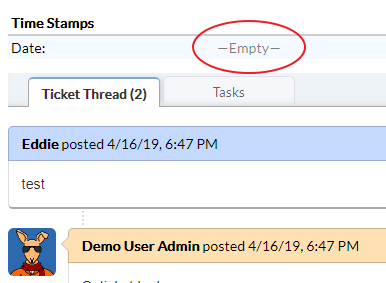
What happens if you click on the —Empty— filed?
In reply to: after the upgrade to v1.11 shows empty form fields with optional visibility
April 16, 2019 at 3:33 pm #3554KeymasterIt seems to me that those 4 phone number fields are something that someone has added on your end. It is unique to your installation.
Have you tried looking in Agent Panel > Manage > Forms > Company Information?
In reply to: ticket thread
April 16, 2019 at 9:33 am #3544KeymasterHi @ramonb,
I like the idea… I’m imagining it would work similar to how Conversation View works in Gmail. All the past messages are collapsed except for the most recent one at the bottom. You can click on each message header to expand it, or click an icon to expand all of them at once.
I like the idea, but it would require quite a lot of programming and testing. For now I have to focus on bug fixes and other improvements, but I’ll keep this one at the back on my mind.
In reply to: new 1.11 Logo Issues
April 4, 2019 at 3:45 pm #3453KeymasterI would like to investigate and fix this.
Someone kindly send me the URL to their installation by either posting it here or emailing it to info@osticketawesome.com.
Thanks!