
Anonymous
Forum Replies Created
-
In reply to: What is this???
August 22, 2019 at 8:34 am #4992stevland
KeymasterNo problem. This type of thing happens to a new user once in a while. I need to add “clear your cache” as the final step in the installation instruction.
In reply to: Blank Blue Screen 1.12.2 Version upgrade new installation
August 21, 2019 at 10:32 pm #4989KeymasterPlease send the URL of your helpdesk to info@osticketawesome.com and I will take a look.
In reply to: Footer logos
August 21, 2019 at 7:05 pm #4987KeymasterYou caught me on a good day! Glad I could help.
In reply to: Footer logos
August 21, 2019 at 5:02 pm #4985In reply to: Display Width Limit?
August 21, 2019 at 4:58 pm #4984KeymasterThe table width is actually 100% of the space denoted by the tag #content.
Therefore, it is dictated by this (/osta/css/staff-desktop.css, line 55):
#content {
max-width: 1200px;
}But #content is a global template element that affects all pages, so if you want to tinker with the ticket list table you’ll want to do something like this to /osta/user-styles.css:
.index-page #content,
.tickets-page #content {
max-width: 100%;
}What you’ll find, however, is that this is not the magic fix that you are hoping for. The table itself will be wider, but the columns will retain their previous width. And if I remember correctly, setting the column widths using the new osTicket method of doing so is ignored by osTicket Awesome. But I could be wrong about this.
It has been a few months since I’ve tweaked the table layout, but let me assure you that possibly a hundred hours has gone into tweaking it over the past few years. I’m sure widening the table looks like a super easy thing to do, but even going from 940px to 1200px was a challenge.
Also keep in mind that if you make the table and columns wider, you’ll also want to test everything on smaller screens before declaring victory.
Please don’t mistake my willingness to point you in the right direction as a promise that you’ll find success, or a guarantee that I’ll support you in this endeavor.
Having said that, if you manage to pull off something that you are happy with and want to have it considered for inclusion in a future release, feel free to post your findings here.
In reply to: Display Width Limit?
August 21, 2019 at 4:23 pm #4981KeymasterThe width of osTicket’s ticket list table is 940px.
In osTicket Awesome it is increased to a maximum width 1200px.
Not the improvement that you were hoping for, perhaps, but it is 27% wider.
Note that you have enabled 4 extra columns in that screenshot. I have to wonder if you would be happier with fewer custom columns.
A full-width ticket list (or at least a wider ticket list) in desktop layout is something that has been requested and is being considered for future development. Feel free to add your vote here.
I’m going to mark this as Resolved as there really isn’t anything to be “fixed”. But feel free to reply.
In reply to: What is this???
August 21, 2019 at 4:11 pm #4979KeymasterClear your browser cache and let me know if that fixes the issue.
In reply to: Up Arrow on tickets
August 21, 2019 at 11:00 am #4975KeymasterHi boxer2t,
You’re right, I have the back to top button hidden in the mobile layout.
If you want to enable it, add the following code to /osta/user-styles.css:
@media screen and (max-width: 760px) {
#scroll-to-top {
display: inline;
}
}What do you guys think… should the back to top button be shown in the mobile layout, or is it superfluous?
In reply to: Error 500 Install – header.inc.php
August 21, 2019 at 10:40 am #4974In reply to: Vista de tickets
August 21, 2019 at 10:37 am #4973KeymasterLo sentimos, no hay opciones integradas para ajustar las fuentes en esa página.
La única forma de hacer cambios es usar CSS para anular los estilos. Pero esto requeriría algunos conocimientos sobre cómo escribir código CSS.
Se supone que la fuente utilizada para los números Abrir / Cerrado es Product Sans. Debe tener un aspecto como este:

Pero por alguna razón, la fuente Product Sans no se está utilizando en su instalación y los números parecen demasiado grandes.
Entonces, por ejemplo, si desea reducir el tamaño de esos números, puede agregar el siguiente código CSS a /osta/user-styles.css:
span.number {
font-family: sans-serif;
font-size: 20px;
position: initial;
}Con respecto a que Asunto se capitaliza, osTicket Awesome no está haciendo esto. Sus usuarios o agentes deben estar usando TODAS LAS MAYÚSCULAS cuando escriben el Asunto.
Estoy usando Google Translate para tratar de expresar algunos pensamientos complicados, espero que mis palabras sean claras y que esto te ayude.
No dude en responder si tiene más preguntas.
In reply to: Issue with sending a link
August 21, 2019 at 10:08 am #4972KeymasterTo be honest, this doesn’t sound like an issue specific to osTicket Awesome. But I am willing to try to help you narrow down the cause of the problem.
First, try clearing your browser cache and try again.
If that doesn’t help, try the Email Access Link function through the osTicket core interface (hopefully you kept a working copy of your original osTicket installation). Let me know if this works or not.
HTTP Error 500 is a very generic message that is displayed on the web page. The actual error message is recorded in the error logs, usually the Apache error logs. Have a look for the relevant message that is being recorded at the time that the Email Access Link form is submitted. Feel free to post the error here.
In reply to: Installed and nothing happened.
August 16, 2019 at 1:57 pm #4969KeymasterHola @sistemascsc,
Estoy feliz de echar un vistazo. ¿Cuál es la URL de su instalación?
Si prefiere mantenerlo en privado, puede enviar el enlace por correo electrónico a info@osticketawesome.com.
In reply to: Error 500 Install – header.inc.php
August 16, 2019 at 1:51 pm #4967In reply to: Error 500 Install – header.inc.php
August 15, 2019 at 2:00 pm #4961KeymasterWow, this is a very unusual situation. The latest version has been downloaded dozens of times and this is the first issue that has been reported.
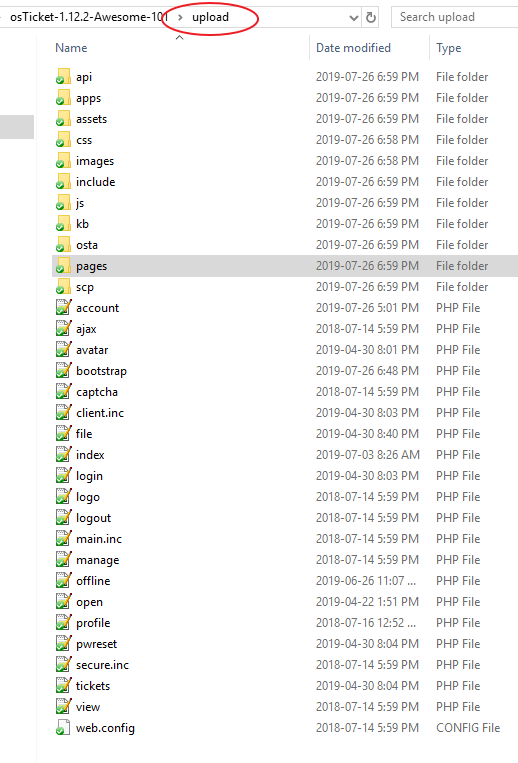
So you are saying that when you extract osTicket-1.12.2-Awesome-101.zip to your computer, the /osta folder is missing?!
Do you get any error messages when you extract it?
I would offer to take a look or even upload the files for you, but as you are on a private network this will not be possible.
If you send an email to info@osticketawesome.com I will reply with a Dropbox link to the archive. Maybe you’ll have better luck downloading it from another server.